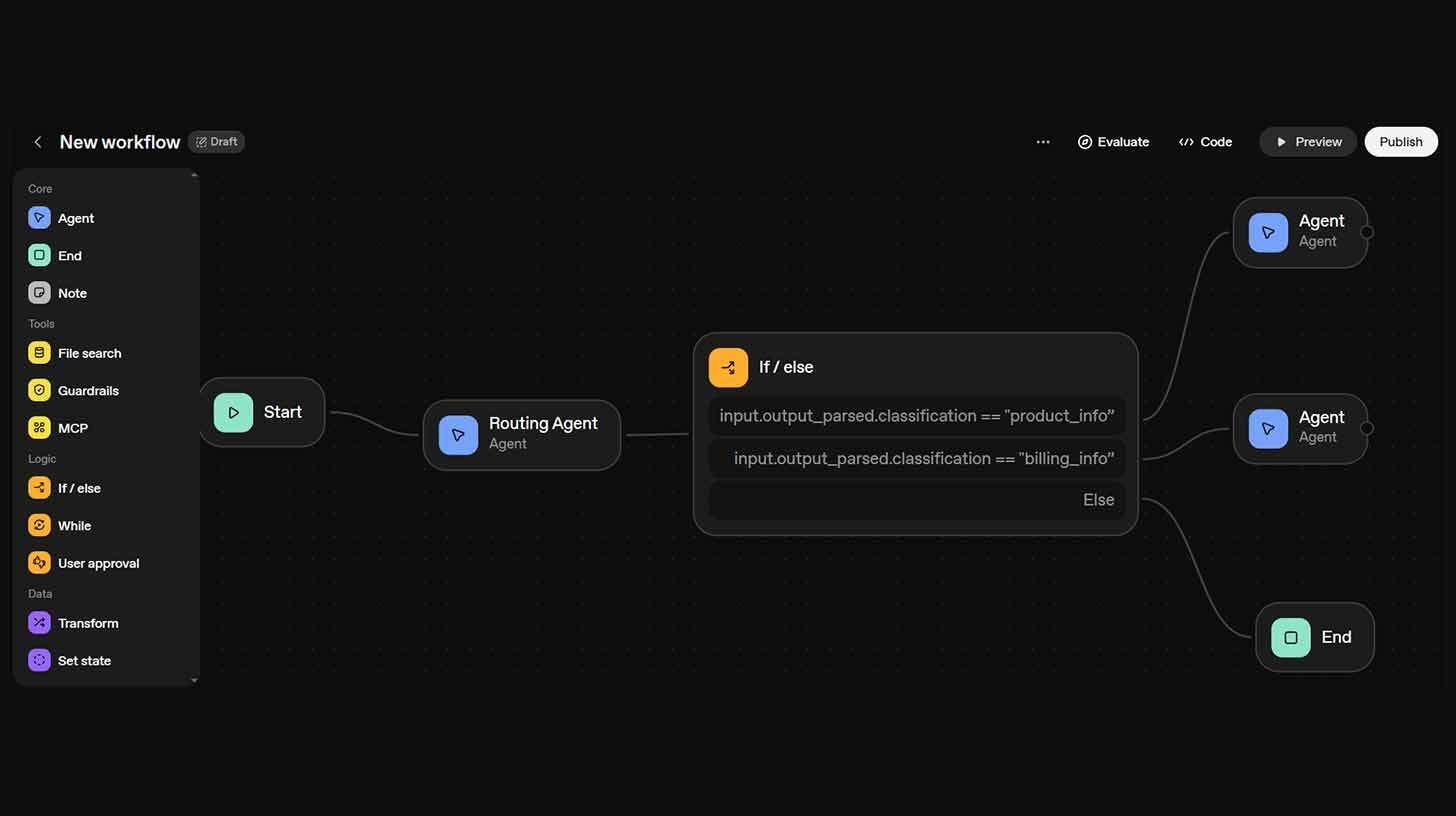
Use Agent Builder to create an AI customer support process
Step-by-step:
Visit platform.openai.com/agent-builder, log in, and then go to the Billing area to add credits to your account.
Initiate a new workflow by selecting "+ Create" and adding an agent node as a routing agent with the following prompt: "You are a customer support classifier."
Sort the user's intent into "product_info" or "billing_info," then set up the output by using enum values in structured JSON.
Use conditions such as input.output_parsed.classification == "product_info" to connect your routing agent to a conditional block (if-else node).
Next, establish two specialized agent nodes: one for product information and one for billing support.
Finally, use the "File Search" tool to upload pertinent documentation.
To test several situations, such as "How do I use the analytics feature?" or "I was charged twice this month," click preview.
Then, click publish to obtain a workflow ID for Chatkit integration.
This routing pattern can also be used for internal help desk systems, lead scoring, or sales qualification; the same structure is applicable anyplace you require specific responses and intelligent categorization.
Your one-stop shop for automation insights and news on artificial intelligence is EngineAi.
Did you like this article? Check out more of our knowledgeable resources:
Watch this space for weekly updates on digital transformation, process automation, and machine learning. Let us assist you in bringing the future into your company right now