Step-by-step:
To manage data connections, visit CData Connect AI, create a free account, and go to the dashboard.
Click "Add Connection," choose Google Sheets, log in with your Google credentials, and then click "Save & Test" to verify the connection.
Add the CData MCP server to Claude Desktop using the URL https://mcp.cloud.cdata.com/mcp, then log in with your CData login information.
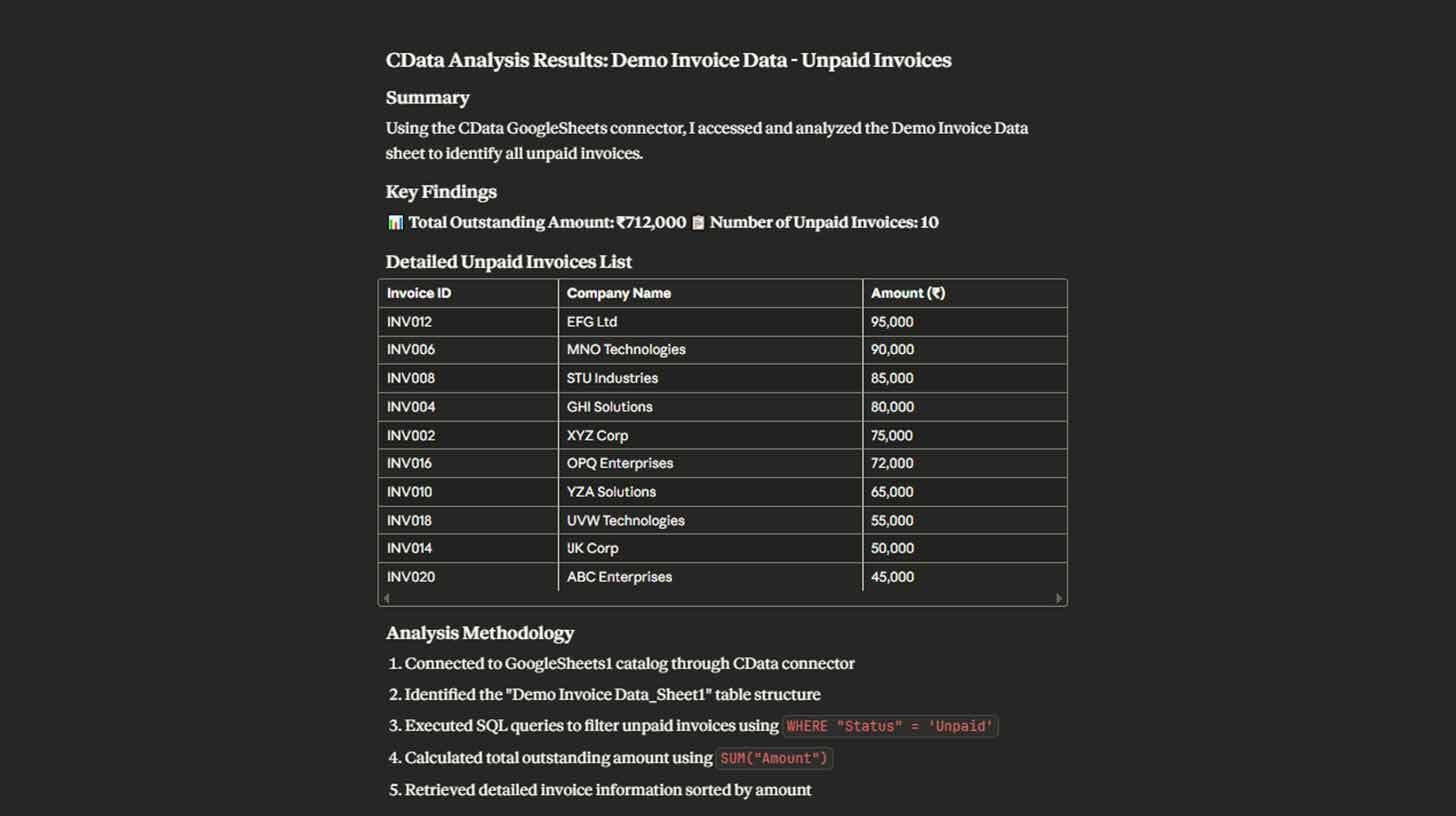
"Use CData to analyze the Demo Invoice Data sheet and show me all unpaid invoices with company names and amounts, then calculate total outstanding" is an example of a natural language query for your data.
Click "Add Connection," choose Google Sheets, log in with your Google credentials, and then click "Save & Test" to verify the connection.
Add the CData MCP server to Claude Desktop using the URL https://mcp.cloud.cdata.com/mcp, then log in with your CData login information.
"Use CData to analyze the Demo Invoice Data sheet and show me all unpaid invoices with company names and amounts, then calculate total outstanding" is an example of a natural language query for your data.
Your one-stop shop for automation insights and news on artificial intelligence is EngineAi.
Did you like this article? Check out more of our knowledgeable resources:
📰 In-depth analysis and up-to-date AI news .
🤝 Visit to learn about our goal and knowledgeable staff.
📬 Use this link to share your project or schedule a free consultation.
Watch this space for weekly updates on digital transformation, process automation, and machine learning. Let us assist you in bringing the future into your company right now.
Did you like this article? Check out more of our knowledgeable resources:
📰 In-depth analysis and up-to-date AI news .
🤝 Visit to learn about our goal and knowledgeable staff.
📬 Use this link to share your project or schedule a free consultation.
Watch this space for weekly updates on digital transformation, process automation, and machine learning. Let us assist you in bringing the future into your company right now.