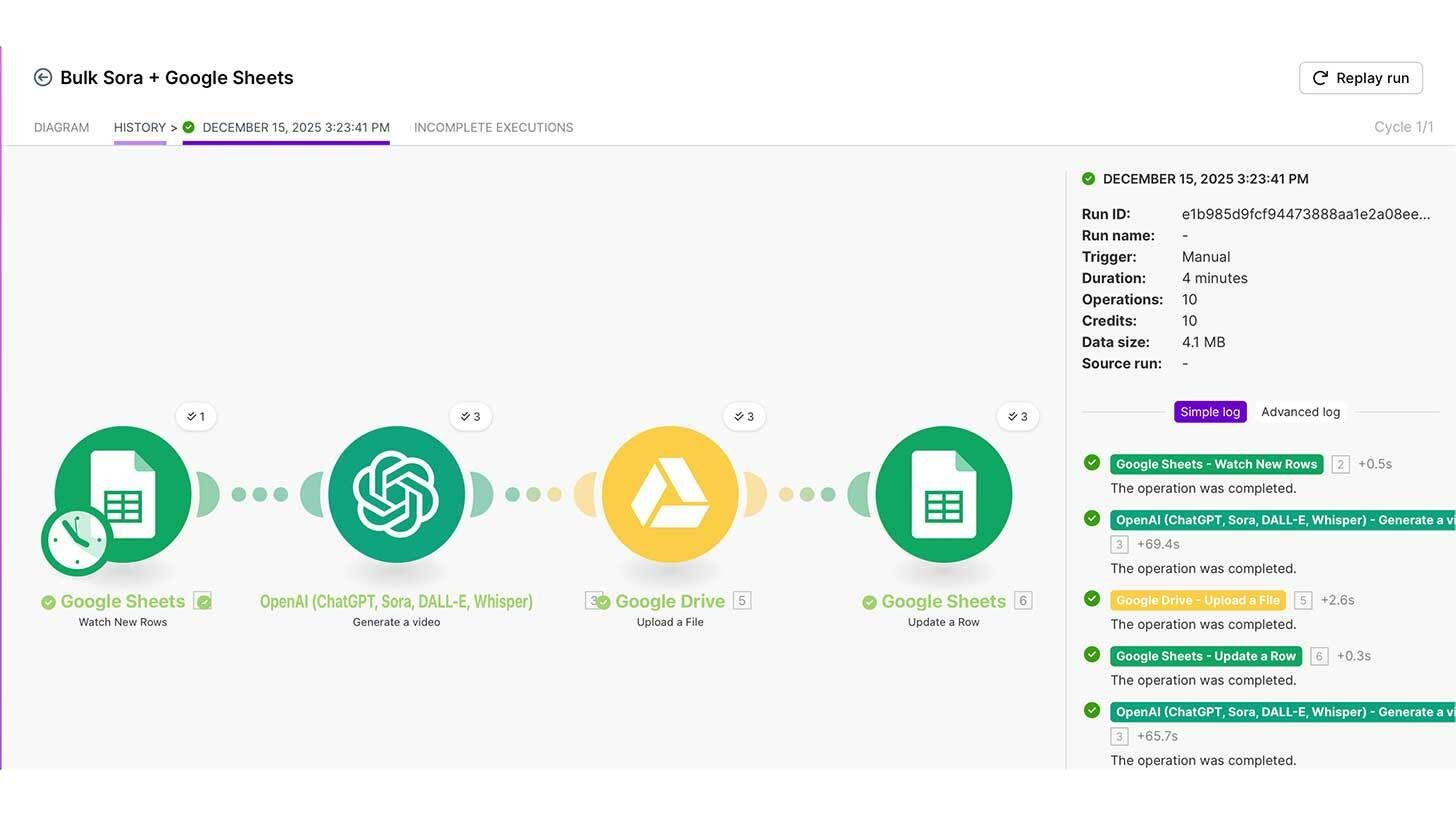
Step-by-step:
Make a copy of this Google Sheet template, log into Make.com, and use the Google Sheets "Watch Rows" trigger to create a new scenario.
generate a Google Drive folder and add the "Upload a File" module after adding a Sora module with your API key (generate one if necessary and validate the organization).
After adding a Google Sheets "Update a Row" module that adds the "Web View link" to the drive link column, create prompts with ID numbers in your sheet and select "run once" in Make.
Links to finished videos in your Google Drive will be added to your Google Sheet in a matter of minutes.
generate a Google Drive folder and add the "Upload a File" module after adding a Sora module with your API key (generate one if necessary and validate the organization).
After adding a Google Sheets "Update a Row" module that adds the "Web View link" to the drive link column, create prompts with ID numbers in your sheet and select "run once" in Make.
Links to finished videos in your Google Drive will be added to your Google Sheet in a matter of minutes.
You may configure Google Sheets to launch a webhook directly to Make each time a row is modified, saving you from having to wait every fifteen minutes for the automation to start.
Your one-stop shop for automation insights and news on artificial intelligence is EngineAi.
Did you like this article? Check out more of our knowledgeable resources:
📰 In-depth analysis and up-to-date AI news .
🤝 Visit to learn about our goal and knowledgeable staff.
📬 Use this link to share your project or schedule a free consultation.
Watch this space for weekly updates on digital transformation, process automation, and machine learning. Let us assist you in bringing the future into your company right now.
Did you like this article? Check out more of our knowledgeable resources:
📰 In-depth analysis and up-to-date AI news .
🤝 Visit to learn about our goal and knowledgeable staff.
📬 Use this link to share your project or schedule a free consultation.
Watch this space for weekly updates on digital transformation, process automation, and machine learning. Let us assist you in bringing the future into your company right now.