How to do a brand refresh with Claude Design – EngineAI

How to do a brand refresh with Claude Design

How to do a brand refresh with Claude Design

A month ago, rebranding a company meant weeks of meetings, mood boards, agency presentations, and five-figure invoices. A designer would audit your existing materials, interview stakeholders, sketch concepts, iterate based on feedback, and finally deliver a style guide, a logo suite, and maybe a few web components. The process was linear, expensive, and exhausting.


Then Anthropic launched Claude Design. And the process changed.


Claude Design is not a design tool in the traditional sense. It is a design collaborator that can read your existing website, extract your brand essence, generate a refreshed visual identity, and produce a complete set of deliverables—marketing pages, web app components, slide decks, and more—in a single conversation. The outputs are not rough drafts. They are production-ready assets that can be exported to Claude Code, Canva, PPTX, PDF, or standalone HTML.


This guide will walk you through a complete brand design workflow using Claude Design, from a screenshot of your current site to a full design system with typography, colors, web components, a website, and PowerPoint templates. The entire process takes about an hour—less time than a single stakeholder meeting in the old world.


Note: Claude Design is available to Claude Pro, Max, Team, and Enterprise subscribers. You will need access to at least one AI image generation tool (ChatGPT, Midjourney, or similar) for the logo step.


Part I: The Audit – Reading Your Current Brand

Every brand redesign starts with understanding what already exists. In the old workflow, this meant a discovery phase—interviews, surveys, and a lot of expensive consultant hours. In the new workflow, it starts with a screenshot and a single prompt.


Step 1: Capture your current site

Take a full-page screenshot of your current website. Include the header, hero section, a content block, and the footer. If your site has multiple distinct page templates (e.g., a marketing page and an app dashboard), screenshot those as well.


Step 2: Analyze and refresh

Drop the screenshot into your favorite AI image model. We used ChatGPT-4o's vision capabilities, but Claude itself (Opus 4.7) or Gemini 3.1 Pro would also work. Use this prompt:


*"Analyze this website and create a refreshed brand description. Keep what works—the core personality, the successful visual elements, the tone of voice—but sharpen the positioning, visual direction, typography, and color palette. Identify what feels dated, generic, or inconsistent. Give me a concise brand summary I can use in Claude Design (about 200-300 words, focusing on visual and tonal guidelines)."*


The AI will return a structured brand description. It might identify that your current typography is too playful for a B2B audience, or that your color palette lacks contrast, or that your positioning is muddled. It will then propose a refreshed direction.


Pro tip: If you have existing brand guidelines (a PDF style guide, a Notion doc, a set of Figma files), upload those as well. The more context you provide, the sharper Claude Design's output will be.


Step 3: Review and refine

Read the AI's brand description. Does it feel true to your organization? If something is off—the tone feels too formal, the color direction is wrong—ask for a revision. "Make it more adventurous" or "Simplify the color palette to two primary colors" are valid follow-ups. Iterate until you have a description you believe in.


This entire audit-and-refresh process takes about 10 minutes. In the old world, it would have taken a week.


Part II: The Logo – Generating Your Visual Mark

With a refreshed brand description in hand, it is time to create the visual centerpiece of your identity: the logo.


Step 1: Choose your image model

Claude Design does not generate logos directly. It will incorporate logos you provide into its designs. So you need to generate a logo elsewhere. We liked ChatGPT's image model (DALL-E 4, built into GPT-5.5) for this task, but Midjourney, Adobe Firefly, or any other image generator will work. The key is a model that understands typography and can generate clean, scalable marks.


Step 2: Craft your logo prompt

Take your brand description and turn it into a logo prompt. Be specific:


"Generate a logo and a wordmark logo for a brand called [Your Brand Name]. The brand description is: [paste your description]. The logo should be modern, clean, and scalable. The wordmark should pair with the logo mark. Provide two versions: a horizontal lockup (mark + wordmark) and a vertical stack (mark above wordmark). Use a color palette consistent with the brand description."


Step 3: Generate and select

Run the prompt. Generate at least four variations. Look for:


Clarity: Is the mark recognizable at small sizes?


Versatility: Does it work in black and white?


Distinctiveness: Is it unique, or does it look like a generic template?


Typography: Is the wordmark legible and well-kerned?


Select the best option. If none are perfect, iterate: "Make the icon more abstract" or "Use a serif font for the wordmark" or "Simplify the mark to a single shape."


Step 4: Prepare your assets

Download the final logo and wordmark as PNG files with transparent backgrounds. Also save versions on a light background and a dark background. Claude Design will use these as reference assets.


The logo step takes about 15 minutes. In the old world, a professional logo design would take 1-2 weeks and cost $2,000-10,000. AI is not a perfect substitute for a top-tier brand designer, but for most startups, internal projects, and small businesses, it is more than sufficient.


Part III: Claude Design Setup – Feeding the System

Now you move to Claude Design. This is where the real magic happens.


Step 1: Navigate to Claude Design

Go to claude.ai/design. (If you receive a region block message, you may need to use a VPN or check Anthropic's supported countries list.)


Step 2: Open the Design Systems tab

Click on the Design systems tab. This is Claude Design's brand memory. Anything you put here will be applied to every future project.


Step 3: Enter your brand information

You will see several fields. Fill them as follows:


First box (Site name): Enter your company or product name. This is how Claude will refer to the brand.


Last box (Brand description): Paste the refreshed brand description you created in Part I. This is the most important input. Be precise.


Step 4: Upload your assets

Claude Design accepts images, PDFs, and even code files. Upload:


Your logo (PNG, transparent background)


Your wordmark (PNG, transparent background)


Any other visual assets you want Claude to use (photos, patterns, icons, existing marketing materials)


If you have a design system file (Figma, Sketch, or even a PDF style guide), upload that as well


Step 5: Hit enter

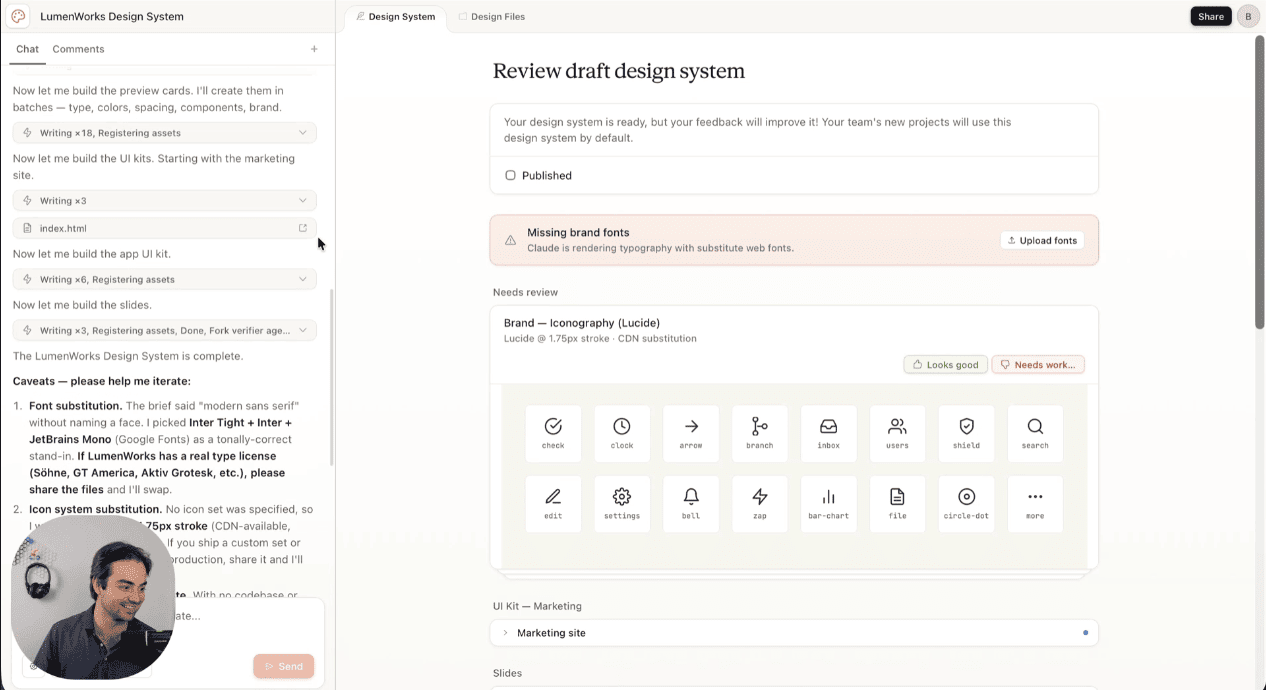
Claude will process your inputs. This takes about 30-60 seconds. When it finishes, it will have built a persistent design system that includes:


Your color palette (primary, secondary, accent, neutrals)


Your typography (heading and body fonts, with sizes and weights)


Your component styles (buttons, cards, forms, navigation)


Your spacing and layout grid


Your logo usage rules


This design system is now saved to your account. Every future Claude Design project—whether you are building a landing page, a slide deck, or a web app—will automatically use these brand guidelines.


"The design system is the killer feature," said Sarah Jenkins, a design operations consultant who has been using Claude Design in beta. "Once you build it, you never have to tell Claude your brand colors again. It just knows. That saves hours of repetitive prompting."


Part IV: The Deliverables – Marketing Pages, Web Apps, and Slide Decks

With your design system in place, you can now generate actual deliverables. Claude Design will have already created several things automatically.


Step 1: Review the auto-generated assets

After you build your design system, Claude Design automatically generates:


A marketing page (homepage template)


A web app page (dashboard or application interface template)


A set of slide decks (typically 5-10 slides with brand-compliant layouts)


These are not placeholders. They are fully designed, interactive pages (HTML/CSS) and slide decks (which you can export to PPTX or Canva).


Step 2: Provide feedback

Claude Design accepts multiple forms of refinement:


Inline comments: Click on any element and type a comment. "Make this button larger." "Change this heading to our brand color."


Direct edits: Select text and type over it. Claude will adjust spacing and layout to accommodate your changes.


Custom sliders: For any design property (spacing, color intensity, layout density), Claude can generate a slider control. Adjust the slider, and Claude updates the design live.


Iterate until the designs feel right. Because Claude remembers your design system, refinements are consistent across all deliverables. Changing the primary button color on the marketing page automatically updates it on the web app page and the slide decks.


Step 3: Add specific prompts

If you need something the auto-generated templates do not include, just ask. "Add a pricing section with three tiers" or "Create a slide about our team history" or "Add a customer testimonial carousel." Claude will generate new components that match your design system.


The refinement process takes about 20-30 minutes. In the old world, designing a homepage, a dashboard, and a slide deck from scratch would take 2-3 weeks.


Part V: The Handoff – Exporting to Claude Code and Other Tools

The final step is getting your designs out of Claude Design and into production.


Step 1: Use the Share button

Click Share in the top-right corner of Claude Design. You have several options:


Internal URL: Anyone in your organization with the link can view the design. You can grant edit access to collaborators.


Export to Canva: For slide decks and marketing materials, sending to Canva allows non-designers to make additional tweaks.


Export as PPTX: For presentations, a standard PowerPoint file.


Export as PDF: For printing or archiving.


Export as standalone HTML: For web pages, this gives you a complete, self-contained HTML file you can host anywhere.


Step 2: Hand off to Claude Code

The most powerful option is the Claude Code handoff. Click this, and Claude Design packages everything—the design, the components, the interactions, the assets—into a bundle. You then go to Claude Code (available within Claude.ai or as a standalone interface) and give a single instruction:


"Build the design from the handoff bundle."


Claude Code will generate the actual implementation code: React components, CSS modules, HTML structure, and even basic interactivity. The handoff is lossless. The design intent is preserved.


"This is the loop closer," said Marcus Wei, a full-stack developer who has used the handoff extensively. "Before Claude Design, I would get a Figma file from a designer and spend days translating it into code. Now the design exports directly to Claude Code. I still need to review and tweak, but 80% of the work is done. That is transformative."


Step 3: Deploy

From Claude Code, you can:


Copy the generated code directly.


Push to a GitHub repository.


Deploy to Vercel, Netlify, or any hosting provider.


Continue iterating with Claude Code's coding assistance.


The entire process—from screenshot to deployed website—can take as little as two hours. For a simple marketing site, you could go from idea to live in an afternoon.


Pro Tips for Power Users

Maintain multiple design systems

Claude Design allows you to store more than one design system. If you work on multiple brands (an agency, a holding company, a product portfolio), you can switch between systems. Each system retains its own colors, typography, and components.


Iterate the design system, not just the outputs

If you notice that Claude consistently makes a certain mistake—using the wrong heading hierarchy, misapplying spacing—do not fix it in each output. Go back to the Design Systems tab and update the system. The fix will propagate to all future projects.


Use Claude Design as a collaboration tool

Designs have organization-scoped sharing. You can keep a document private, share it so anyone in your organization with the link can view it, or grant edit access so colleagues can modify the design and chat with Claude together in a group conversation. Use this for design reviews. Instead of asynchronous feedback in a Slack thread, gather the team in Claude Design and refine live.


Combine with external assets

Claude Design can accept uploaded images, PDFs, and code files. If you have existing brand photography, icon sets, or illustration libraries, upload them. Claude will incorporate them into its designs, respecting your existing assets.


Export early, export often

Do not wait for perfection. Export a draft to Claude Code, see how the implementation feels, then return to Claude Design to refine. The handoff is bidirectional—you can take code from Claude Code, bring it back into Claude Design as context, and iterate further. The loop is closed.


Why This Workflow Changes Everything

The traditional brand design process was linear, siloed, and slow. Discovery led to design led to development, with handoffs between specialists who spoke different languages. Feedback loops were measured in days. Iteration was expensive.


Claude Design collapses that pipeline. The same tool that analyzes your brand builds your design system, generates your deliverables, and hands off to code. Feedback is instantaneous. Iteration is free. The designer, the developer, and the stakeholder can collaborate in the same conversation.


"For founders, this is a superpower," said Chen. "You no longer need to hire a designer to build a pitch deck, a marketing site, and a prototype. You can do it yourself in an afternoon. That lowers the barrier to launching a new product by an order of magnitude."


For professional designers, Claude Design is not a threat—it is a power tool. It handles the mechanical work: generating consistent components, applying brand guidelines, exporting to multiple formats. It frees designers to focus on strategy, creativity, and the human judgment that AI still cannot replicate.


Your one-stop shop for automation insights and news on artificial intelligence is EngineAi.

Did you like this article? Check out more of our knowledgeable resources:

• 📰 In-depth analysis and up-to-date AI news


• 🤝 Visit to learn about our goal and knowledgeable staff


• 📬 Use this link to share your project or schedule a free consultation


Watch this space for weekly updates on digital transformation, process automation, and machine learning. Let us assist you in bringing the future into your company right now

← Back to all articles

Explore More AI Resources

📚 AI Glossary

🏆 Best AI Tools

⚡ AI Comparisons

📘 AI Guides

What is Artificial Intelligence?

Artificial intelligence represents one of the most significant technological advances in human history, fundamentally changing how we interact with computers and digital systems. At its core, AI enables machines to perform tasks that historically required human intelligence, including visual perception, speech recognition, decision-making, and language translation. The field has evolved rapidly from narrow AI systems designed for specific tasks to increasingly sophisticated models capable of generalized reasoning.

Machine learning, a subset of AI, allows systems to learn and improve from experience without being explicitly programmed. Deep learning, in turn, uses neural networks with many layers to process complex data and recognize intricate patterns. These technologies power everything from the recommendation engines that suggest your next movie to the autonomous vehicles that may soon drive our roads. Understanding the fundamentals of AI helps business leaders, developers, and consumers alike navigate an increasingly AI-powered world.

The impact of AI extends across every industry and sector of the economy. Healthcare organizations use AI for diagnostic imaging analysis and drug discovery. Financial institutions deploy AI for fraud detection and risk assessment. Manufacturers implement AI for predictive maintenance and quality control. Retailers leverage AI for inventory management and personalized marketing. These applications demonstrate how AI creates value by automating routine tasks, extracting insights from vast data sets, and enabling new capabilities that were previously impossible.

Applications of AI Across Industries

The practical applications of AI technology span an extraordinarily wide range, touching virtually every aspect of modern life. In healthcare, AI systems analyze medical images to detect cancers earlier and more accurately than human radiologists in some studies. AI-powered drug discovery platforms can simulate molecular interactions and predict which compounds might treat diseases, potentially accelerating the development of new medications by years. Surgical robots assisted by AI enable minimally invasive procedures with greater precision than traditional techniques.

In finance, AI algorithms process millions of transactions per second to identify fraudulent activity in real time. Trading systems use AI to analyze market conditions and execute trades at speeds and scales impossible for human traders. Credit scoring models leverage AI to evaluate borrower risk more accurately, expanding access to credit for underserved populations while maintaining lender profitability. Insurance companies use AI for claims processing and fraud detection, reducing costs and improving customer satisfaction.

Manufacturing and logistics companies use AI for predictive maintenance, identifying when machines are likely to fail before breakdowns occur, reducing downtime and repair costs. Supply chain optimization algorithms powered by AI consider thousands of variables to minimize inventory costs while ensuring product availability. Autonomous vehicles and drones promise to revolutionize transportation and delivery, with AI systems processing sensor data in real time to navigate safely through complex environments.

Getting Started with AI

Beginning your journey with AI does not require advanced degrees or massive technical expertise. Modern AI tools and platforms have made the technology increasingly accessible to users across skill levels. Start by exploring the fundamentals through resources like our comprehensive AI Glossary which explains key terms and concepts in accessible language. Build familiarity with common AI applications by experimenting with tools you already use, many of which incorporate AI features without requiring explicit AI expertise.

For organizations looking to adopt AI, the key is starting with clear problem identification. Successful AI initiatives begin by identifying specific business challenges where AI might add value, rather than implementing AI for its own sake. Common early applications include customer service chatbots, document processing automation, and data analysis tools. These provide measurable value while allowing teams to build AI capabilities and familiarity progressively.

Our AI Tools Directory provides comprehensive information on hundreds of AI-powered applications across categories including natural language processing, computer vision, predictive analytics, and process automation. Browse the directory to discover tools that match your specific needs, and read our detailed reviews and comparisons to inform your selection decisions. The rankings are based on extensive hands-on testing and evaluation by our expert team.

AI Resources and Learning

Staying current with AI developments requires ongoing learning and engagement with the field. Our AI Guides provide in-depth tutorials and explainers on topics from beginner fundamentals to advanced implementation techniques. Whether you are looking to understand how large language models work, learn best practices for prompt engineering, or implement AI automation in your organization, our guides offer practical, actionable guidance based on real-world experience.

The AI landscape evolves rapidly, with new models, tools, and techniques emerging continuously. Our editorial team monitors these developments to bring you timely coverage of significant advances and their practical implications. We provide context and analysis that helps you understand which developments genuinely matter versus passing hype. Subscribe to our newsletter for weekly summaries of the most important AI news and developments.

For those considering AI implementation, our comparisons section offers detailed evaluations of competing tools and approaches, helping you make informed decisions about which technologies suit your needs. Our rankings provide curated recommendations across all major AI categories, from best overall tools to specialized solutions for specific use cases. Each recommendation includes rationale and methodology so you understand exactly why we recommend what we recommend.

Explore Our AI Resources

From beginner guides to advanced tutorials, from tool comparisons to rankings, we provide the comprehensive AI resources you need to succeed.

Browse AI Tools AI Guides Best Rankings Comparisons AI Glossary

AI Technology and Industry Overview

The artificial intelligence industry has experienced remarkable growth and innovation in recent years, with new breakthroughs and capabilities emerging at an unprecedented pace. Large language models have revolutionized natural language processing, enabling applications from conversational AI to automated content generation. Computer vision systems can now recognize objects and scenes with accuracy rivaling or exceeding human performance in many domains. These advances have created new possibilities for businesses across every sector, from automating routine tasks to enabling entirely new products and services that were previously impossible.

Understanding the AI landscape requires familiarity with key concepts and terminology. Machine learning provides the foundation for most modern AI systems, enabling computers to learn patterns from data rather than following explicit programming. Deep learning uses neural networks with many layers to handle complex tasks like image recognition, speech processing, and language understanding. Large language models represent a particularly powerful class of deep learning systems trained on vast text corpora to understand and generate human language with remarkable fluency.

The practical applications of AI technology span virtually every industry and domain. In healthcare, AI assists with diagnostics, drug discovery, and personalized treatment recommendations. In finance, AI powers fraud detection, algorithmic trading, and risk assessment. In manufacturing, AI enables predictive maintenance and quality control. In retail, AI drives personalized recommendations and inventory optimization. These applications demonstrate how AI creates value by automating routine tasks, extracting insights from data, and enabling new capabilities.

Implementing AI in Your Organization

Successfully implementing AI requires more than just deploying technology. Organizations must develop clear strategies for identifying appropriate use cases, building data infrastructure, developing internal expertise, and managing change. The most successful AI implementations start with well-defined problems where AI can demonstrate clear value, then expand progressively as capabilities and confidence grow. This approach allows teams to build expertise gradually while generating measurable returns that justify continued investment in AI capabilities.

Building an AI-ready organization requires attention to data quality, infrastructure, and talent. AI systems depend on data, and organizations must have processes for collecting, cleaning, and maintaining high-quality data to train and operate effective AI models. Infrastructure considerations include computing resources, data storage, and integration with existing systems. Talent requirements range from specialized ML engineers and data scientists to product managers and business leaders who can identify AI opportunities and translate them into business requirements.

Change management represents a critical but often overlooked component of AI implementation. Employees may view AI as a threat to their jobs, requiring careful communication about how AI will augment rather than replace human workers. Successful organizations invest in training programs that help employees work effectively alongside AI systems, developing new skills for leveraging AI tools in their daily work. This human-centered approach to AI adoption leads to better outcomes than treating AI as a purely technical implementation.

Evaluating AI Tools and Vendors

The AI tools market has exploded with options ranging from general-purpose platforms to specialized solutions for specific industries and use cases. Evaluating these options requires understanding your specific requirements, use cases, and constraints. General-purpose AI platforms offer flexibility but may require more customization to achieve optimal results for specific applications. Specialized solutions may offer turnkey functionality but could create vendor lock-in or limitations for future needs.

Our comprehensive AI Tools Directory provides detailed information on hundreds of AI tools and platforms. We evaluate each tool across dimensions including capability, ease of use, pricing, and support. Our rankings provide curated recommendations based on extensive testing and analysis. We also offer detailed comparisons that evaluate how competing tools stack up against each other across real-world use cases.

When evaluating AI vendors, consider factors beyond just technical capability. Data privacy and security policies determine how your data will be handled and stored. Pricing models vary significantly, from per-user subscriptions to consumption-based billing. Support and documentation quality affects how quickly your team can become productive with new tools. Integration capabilities determine how easily AI tools fit into existing workflows and systems.

AI Best Practices and Ethics

Responsible AI development and deployment requires attention to ethics, fairness, and potential societal impacts. AI systems can inadvertently perpetuate or amplify biases present in training data, leading to unfair outcomes for certain groups. Organizations must implement processes for auditing AI systems for bias and taking corrective action when problems are identified. Transparency about how AI systems make decisions helps build trust and enables accountability.

Data privacy represents another critical consideration for AI implementations. AI systems often require large amounts of data for training and operation, raising questions about what data is collected, how it is stored, and who has access. Organizations must implement appropriate data governance practices and ensure compliance with relevant regulations like GDPR and CCPA. When selecting AI vendors, carefully review their data handling practices and privacy policies.

Environmental considerations are increasingly important for AI deployments. Training large models can consume significant energy, raising sustainability concerns. Organizations should evaluate the environmental impact of their AI systems and consider strategies for minimizing energy consumption, such as using more efficient model architectures or leveraging cloud providers with strong sustainability commitments. These considerations should be part of comprehensive AI governance frameworks.

Explore Our AI Resources

From tool directories to best practices, from comparisons to tutorials, we provide comprehensive AI resources.

Browse AI Tools AI Guides Best Rankings Comparisons AI Glossary

AI Technology and Industry Overview

The artificial intelligence industry has experienced remarkable growth and innovation in recent years, with new breakthroughs and capabilities emerging at an unprecedented pace. Large language models have revolutionized natural language processing, enabling applications from conversational AI to automated content generation. Computer vision systems can now recognize objects and scenes with accuracy rivaling or exceeding human performance in many domains. These advances have created new possibilities for businesses across every sector, from automating routine tasks to enabling entirely new products and services that were previously impossible.

Understanding the AI landscape requires familiarity with key concepts and terminology. Machine learning provides the foundation for most modern AI systems, enabling computers to learn patterns from data rather than following explicit programming. Deep learning uses neural networks with many layers to handle complex tasks like image recognition, speech processing, and language understanding. Large language models represent a particularly powerful class of deep learning systems trained on vast text corpora to understand and generate human language with remarkable fluency.

The practical applications of AI technology span virtually every industry and domain. In healthcare, AI assists with diagnostics, drug discovery, and personalized treatment recommendations. In finance, AI powers fraud detection, algorithmic trading, and risk assessment. In manufacturing, AI enables predictive maintenance and quality control. In retail, AI drives personalized recommendations and inventory optimization. These applications demonstrate how AI creates value by automating routine tasks, extracting insights from data, and enabling new capabilities.

Implementing AI in Your Organization

Successfully implementing AI requires more than just deploying technology. Organizations must develop clear strategies for identifying appropriate use cases, building data infrastructure, developing internal expertise, and managing change. The most successful AI implementations start with well-defined problems where AI can demonstrate clear value, then expand progressively as capabilities and confidence grow. This approach allows teams to build expertise gradually while generating measurable returns that justify continued investment in AI capabilities.

Building an AI-ready organization requires attention to data quality, infrastructure, and talent. AI systems depend on data, and organizations must have processes for collecting, cleaning, and maintaining high-quality data to train and operate effective AI models. Infrastructure considerations include computing resources, data storage, and integration with existing systems. Talent requirements range from specialized ML engineers and data scientists to product managers and business leaders who can identify AI opportunities and translate them into business requirements.

Change management represents a critical but often overlooked component of AI implementation. Employees may view AI as a threat to their jobs, requiring careful communication about how AI will augment rather than replace human workers. Successful organizations invest in training programs that help employees work effectively alongside AI systems, developing new skills for leveraging AI tools in their daily work. This human-centered approach to AI adoption leads to better outcomes than treating AI as a purely technical implementation.

Evaluating AI Tools and Vendors

The AI tools market has exploded with options ranging from general-purpose platforms to specialized solutions for specific industries and use cases. Evaluating these options requires understanding your specific requirements, use cases, and constraints. General-purpose AI platforms offer flexibility but may require more customization to achieve optimal results for specific applications. Specialized solutions may offer turnkey functionality but could create vendor lock-in or limitations for future needs.

Our comprehensive AI Tools Directory provides detailed information on hundreds of AI tools and platforms. We evaluate each tool across dimensions including capability, ease of use, pricing, and support. Our rankings provide curated recommendations based on extensive testing and analysis. We also offer detailed comparisons that evaluate how competing tools stack up against each other across real-world use cases.

When evaluating AI vendors, consider factors beyond just technical capability. Data privacy and security policies determine how your data will be handled and stored. Pricing models vary significantly, from per-user subscriptions to consumption-based billing. Support and documentation quality affects how quickly your team can become productive with new tools. Integration capabilities determine how easily AI tools fit into existing workflows and systems.

AI Best Practices and Ethics

Responsible AI development and deployment requires attention to ethics, fairness, and potential societal impacts. AI systems can inadvertently perpetuate or amplify biases present in training data, leading to unfair outcomes for certain groups. Organizations must implement processes for auditing AI systems for bias and taking corrective action when problems are identified. Transparency about how AI systems make decisions helps build trust and enables accountability.

Data privacy represents another critical consideration for AI implementations. AI systems often require large amounts of data for training and operation, raising questions about what data is collected, how it is stored, and who has access. Organizations must implement appropriate data governance practices and ensure compliance with relevant regulations like GDPR and CCPA. When selecting AI vendors, carefully review their data handling practices and privacy policies.

Environmental considerations are increasingly important for AI deployments. Training large models can consume significant energy, raising sustainability concerns. Organizations should evaluate the environmental impact of their AI systems and consider strategies for minimizing energy consumption, such as using more efficient model architectures or leveraging cloud providers with strong sustainability commitments. These considerations should be part of comprehensive AI governance frameworks.

Explore Our AI Resources

From tool directories to best practices, from comparisons to tutorials, we provide comprehensive AI resources.

Browse AI Tools AI Guides Best Rankings Comparisons AI Glossary