For the past three decades, the design software industry has followed a predictable rhythm. A designer opens a tool – Adobe Illustrator, Figma, Sketch, Canva – and manipulates pixels, vectors, or components. The tool is a canvas. The designer is the artist. The relationship is asymmetrical: the tool does nothing until the designer acts.
That era may be ending.
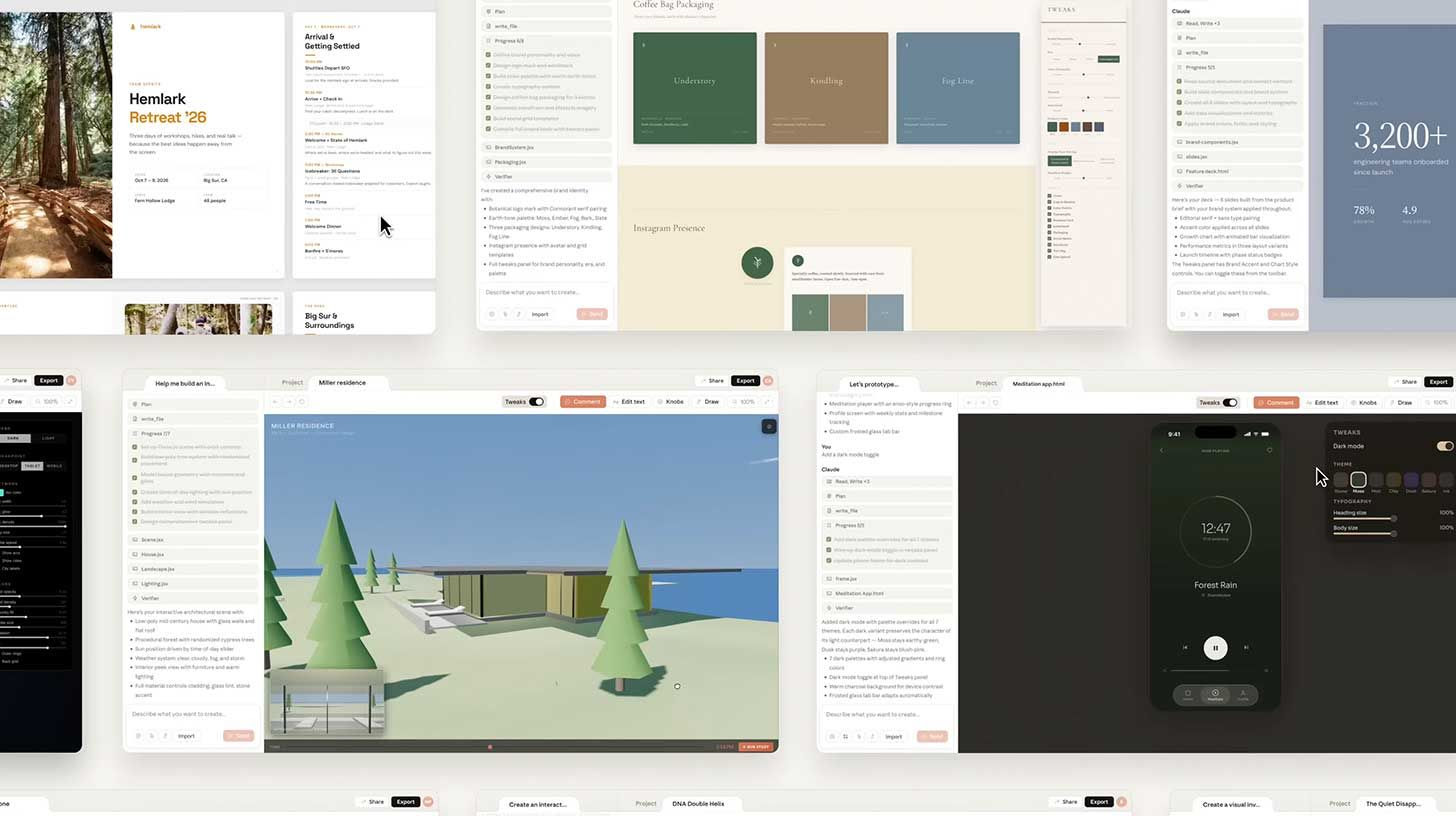
Today, Anthropic is launching Claude Design , a new Anthropic Labs product that turns prompts, screenshots, and entire codebases into interactive prototypes, slide decks, marketing collateral, and even production-ready code. Powered by the company’s new Opus 4.7 vision model , Claude Design is not a design tool in the traditional sense. It is a design collaborator – one that reads your existing work, learns your brand system, generates multiple directions, takes inline feedback, and hands off a complete package to Claude Code for implementation.
The implications are staggering. For years, the AI industry has talked about "closing the loop" – moving from idea to specification to design to code to deployment without human intervention. Claude Design, combined with Anthropic’s existing Claude Code, browser agents, and office integrations, is the closest anyone has come to achieving that vision inside a single ecosystem.
"Even experienced designers have to ration exploration – there's rarely time to prototype a dozen directions, so you limit yourself to a few," Anthropic writes in the announcement. "Claude Design gives designers room to explore widely and everyone else a way to produce visual work."
But the launch has an additional layer of intrigue. On April 14, just three days before Claude Design's announcement, Anthropic's Chief Product Officer Mike Krieger resigned from the board of Figma – the leading collaborative design tool and an obvious competitor to Anthropic's new offering. The timing, which Krieger has not publicly explained, has sparked immediate speculation about conflicts of interest, competitive intelligence, and the quiet war brewing between AI labs and incumbent design software.
Whatever the backstory, the product itself is unambiguous: Anthropic is coming for design. And if Claude Design delivers on its promises, it may be the first AI tool that genuinely threatens the multi-billion-dollar design software market.
Part I: The Opus 4.7 Vision Model – Seeing and Understanding Design
Claude Design is powered by Opus 4.7 , Anthropic's most capable vision model to date. Unlike its predecessors, which were primarily text models with some image understanding tacked on, Opus 4.7 was built from the ground up for visual reasoning – the ability to understand not just what is in an image, but how it is constructed, why it works, and how to change it.
This is a critical distinction. Previous AI design tools (including early versions of Canva's AI and Figma's AI features) could generate images that looked like designs, but they could not reason about design. They could not look at a button and understand that it was a button, that it had specific spacing relative to other elements, that its color signified its importance, and that changing the color would require adjusting the entire component system.
Opus 4.7 can do all of that. According to Anthropic's internal benchmarks, the model achieves near-human performance on design system understanding – the ability to extract colors, typography, spacing rules, and component hierarchies from existing designs. It can look at a codebase and infer the design system embedded in the CSS and component structure. It can take a screenshot of a website and rebuild a reasonable facsimile of its layout.
"The leap from Opus 4.6 to 4.7 is not incremental," said Dr. Elena Vasquez, an AI researcher who has tested the model in beta. "It is architectural. Opus 4.6 could describe an image. Opus 4.7 can edit the image, understand its structure, and apply that understanding to new contexts. That is the difference between a viewer and a designer."
The model's capabilities are evident in Claude Design's feature set. It can:
Read a codebase during setup to extract an existing design system
Generate multiple design variations from a single prompt
Accept inline comments ("make the button larger" or "move the headline to the left")
Generate custom sliders for any design property (spacing, color, layout) that users can adjust in real-time
Export the final design as code, HTML, Canva files, or PPTX
"This is not a co-pilot that suggests things," added Marcus Wei, a product designer who has been using Claude Design internally. "This is a collaborator that does things. It doesn't just say 'try a blue button.' It makes the button blue, adjusts the surrounding spacing to match, and shows you the result. That is a different relationship."
Part II: The Setup – Reading Your Codebase, Building Your Brand
The most distinctive feature of Claude Design is its onboarding process. Unlike generic design tools that start from a blank canvas or a template library, Claude Design begins by reading your existing work.
When a team first uses Claude Design, the model requests access to:
Their codebase (via GitHub, GitLab, or direct upload)
Existing design files (Figma, Sketch, Adobe XD)
Brand guidelines (PDFs, internal wikis, style guides)
Claude Design then builds a design system – a structured representation of the team's colors, typography, spacing rules, component library, and interaction patterns. This system is not static; it can be refined over time as the team provides feedback. Teams can also maintain multiple design systems for different products or brands.
Once the design system is built, every future project in Claude Design automatically applies it. A designer can prompt "create a landing page for our new product" and Claude Design will generate a layout using the team's actual fonts, colors, and components. The output is not generic; it is on-brand from the first frame.
"This is the killer feature," said Sarah Jenkins, a design operations manager at a mid-sized SaaS company. "The biggest cost in design is not the creation; it is the alignment. Every designer has spent hours adjusting colors to match brand guidelines, fixing typography, and arguing about spacing. If Claude Design just handles that automatically, that is worth the subscription price by itself."
The design system is also shareable. Teams can export the system as a JSON file and import it into other instances of Claude Design. This allows agencies to build a system for a client once and reuse it across multiple projects. It also creates a potential lock-in effect: once a team has invested in building its design system inside Claude Design, switching to another tool becomes costly.
"Anthropic is building a moat," noted Alex Chen, a venture capitalist focused on creative tools. "The design system is the asset, not the model. If teams build their systems in Claude Design, they will be reluctant to leave, even if a competitor offers a better model. That is very smart."
Part III: The Workflow – From Prompt to Prototype to Code
Once the design system is established, the actual design workflow in Claude Design is remarkably fluid. Anthropic has identified several common use cases from beta testers:
Realistic prototypes (for designers)
Designers can upload static mockups (PNG, JPG, or even hand-drawn sketches) and ask Claude Design to turn them into interactive prototypes. The model adds clickable elements, transitions, and basic interactivity. The resulting prototype can be shared via a URL for user testing without any code review or pull requests.
"We used to spend days turning static designs into a clickable prototype," said one beta tester quoted in Anthropic's announcement. "Now Claude does it in minutes. It's not perfect, but it's good enough for user testing. That saves us a week per project."
Product wireframes and mockups (for product managers)
Product managers can describe a feature flow in natural language ("when the user clicks 'upgrade,' show a pricing modal with three options, and then a checkout form") and Claude Design generates a complete wireframe. That wireframe can be handed off to Claude Code as a "build-ready bundle" – a package containing the design, the intended interactions, and even suggested implementation patterns.
Design explorations (for fast iteration)
Designers can ask Claude Design to generate multiple directions from a single prompt. The model produces four or five variations, each with different layouts, color treatments, or typographic approaches. The designer can then mix and match elements from different variations, ask for refinements, or start over. This "exploration" mode is designed to overcome the fundamental limitation of human design: time.
Pitch decks and presentations (for founders and sales)
A founder can upload a rough outline (as a DOCX, PPTX, or just a text prompt) and ask Claude Design to turn it into a complete, on-brand pitch deck. The model generates slides, selects layouts, creates charts from provided data, and adds speaker notes. The result can be exported as PPTX, PDF, or sent directly to Canva for further editing.
Marketing collateral (for marketers)
Marketers can generate landing pages, social media assets, and campaign visuals directly in Claude Design. The model can ingest existing campaign briefs (as PDFs or Word documents), extract key messages and visual directions, and produce a full set of assets. Marketers can then loop in designers to polish the results or handle the polish themselves with inline comments.
Frontier design (for developers and tinkerers)
The most technically ambitious use case is "frontier design" – using Claude Design to build code-powered prototypes with voice, video, 3D, and built-in AI. A developer could describe "a 3D product configurator with voice controls" and Claude Design would generate a working prototype in Three.js, complete with voice recognition. This is not production-ready code, but it is a starting point that would previously have required a specialist.
The common thread across all these use cases is the handoff to Claude Code. When a design is ready to be built, Claude Design packages everything – the layout, the components, the interactions, the assets – into a bundle that can be passed to Claude Code with a single instruction: "Build this." Claude Code then generates the actual implementation code, respecting the design intent and following the established patterns.
"Claude Design closes a gap that has frustrated every product team I've worked with," said Jenkins. "Designers design. Engineers build. The handoff is always lossy. Claude Design makes it lossless. The design is the spec. That is a big deal."
Part IV: The Figma Connection – Krieger's Resignation and the Competitive Landscape
No discussion of Claude Design would be complete without addressing the elephant in the room: Mike Krieger.
The Anthropic CPO, who joined the company in 2024 after co-founding Instagram, had been serving on the board of Figma – the collaborative design tool that is, by any reasonable measure, the primary incumbent in the market Anthropic is now entering. On April 14, three days before Claude Design's launch, Krieger resigned from Figma's board.
Anthropic and Figma have both declined to comment on the timing. But the implications are obvious. Krieger would have had access to Figma's strategic plans, product roadmap, and internal discussions about AI. His sudden departure, just before a major Anthropic product that directly competes with Figma's core business, raises uncomfortable questions about conflicts of interest and competitive intelligence.
"Mike Krieger is a respected professional," said Chen. "I am sure he did everything by the book. But the appearance of impropriety is damaging. It gives Figma ammunition to claim that Anthropic had an unfair advantage. And it will make other companies think twice before putting Anthropic executives on their boards."
Figma has not announced any legal action. But the company's leadership must be deeply concerned. Figma has been investing heavily in AI features, including Figma Agents (launched in late 2025) that can generate prototypes and components. But Figma's AI is fundamentally additive – it works inside the existing Figma interface, helping designers work faster. Claude Design is potentially substitutive – it could replace the need for a dedicated design tool at all.
"If Claude Design works as advertised, a product manager could go from idea to prototype to code without ever opening Figma," said Wei. "That is not a competitor. That is an existential threat. Figma's valuation – over $20 billion – assumes that the collaborative design market is durable. Claude Design challenges that assumption."
The tension between Anthropic and Figma is particularly acute given their shared history. Anthropic has long used Figma internally for its own design work. Many Anthropic employees are former Figma users. And the design community – which has embraced Figma as the standard – is deeply loyal. Claude Design will need to be exceptional to overcome that incumbency advantage.
Part V: The Ecosystem Play – Cowork, Browser Agents, and Office Integrations
Claude Design does not exist in isolation. It is the latest piece of Anthropic's broader ecosystem strategy – a suite of products that, together, cover the entire software development lifecycle.
Claude Code (launched 2025): An agentic coding assistant that can write, debug, and refactor software across entire codebases.
Claude Cowork (launched early 2026): A collaborative agent that can join team conversations, answer questions, and take actions across connected applications.
Claude Browser Agents (launched 2025): Autonomous agents that can navigate websites, fill out forms, and perform actions on behalf of users.
Claude Office Integrations (rolling out 2026): Deep integrations with Google Workspace, Microsoft 365, and Notion.
Claude Design is the missing piece: the visual layer. With its addition, Anthropic can now handle:
Ideation (Claude Cowork, conversation)
Design (Claude Design, visual)
Development (Claude Code, implementation)
Deployment (Browser Agents, operations)
Documentation (Office Integrations, communication)
"The loop is closing," said Vasquez. "Every few weeks, an Anthropic launch shakes a new industry. First it was coding. Then it was web browsing. Then it was office work. Now it is design. Add them all together, and you have a platform that can take a product idea from a conversation to a shipped application. That is not a set of tools. That is an operating system."
The obvious comparison is to Apple's ecosystem play – not the most powerful tool in any category, but the most integrated. Anthropic is betting that enterprises will pay a premium for a single platform that handles everything, rather than stitching together best-of-breed solutions from Figma, GitHub, and Notion.
"The enemy is not individual competitors," added Wei. "The enemy is complexity. Every company has a stack of tools that don't talk to each other. Anthropic is offering a unified alternative. If they can deliver on the integration, they will win not because they have the best design tool, but because they have the only tool that doesn't require a spreadsheet to manage."
Part VI: Designer Reactions – Excitement, Anxiety, and Skepticism
The design community's reaction to Claude Design has been predictably mixed. Early access users – the ones quoted in Anthropic's announcement – are effusive.
"Brilliant's intricate interactivity and animations are historically painful to prototype," said a representative from the education platform Brilliant. "Our most complex pages, which took 20+ prompts to recreate in other tools, only required 2 prompts in Claude Design."
Another beta tester, from an unnamed hardware company, added: "Claude Design has made prototyping dramatically faster for our team. What used to take a week of back-and-forth now happens in a single conversation."
But outside the curated beta, reactions are more guarded. Many designers see Claude Design as a threat to their livelihoods – not because it will replace them entirely, but because it will reduce the demand for junior and mid-level design work.
"If a product manager can generate a decent prototype on their own, they won't need to hire a designer for that project," said one freelance designer, speaking on condition of anonymity. "Maybe they still need a senior designer for the critical work. But the volume of work will drop. Fees will drop. There will be fewer seats at the table."
Others are skeptical of Claude Design's ability to handle "real" design – the kind that involves strategic judgment, emotional resonance, and stakeholder alignment.
"AI can generate a layout that follows brand guidelines," said Maya Rodriguez, a design director at a Fortune 500 company. "But can it understand why one shade of blue feels trustworthy and another feels cold? Can it navigate political feedback from three different executives? Can it advocate for users when the business wants something else? Those are the hard parts of design. And Claude Design does nothing for them."
Anthropic acknowledges this limitation. The company positions Claude Design as a tool for exploration and execution, not strategy. The designer remains responsible for the "what" and "why." Claude handles the "how."
"The goal is not to replace designers," a product lead told me. "The goal is to free designers from the mechanical work – the resizing, the reformatting, the repetitive adjustments – so they can focus on the human work. If we succeed, designers will be more valuable, not less."
That is the optimistic view. The pessimistic view is that the "mechanical work" is how junior designers learn their craft. Remove it, and you remove the apprenticeship. Replace it with AI, and you create a generation of designers who can prompt but cannot execute.
"We are going to find out," said Chen. "The technology is here. The only question is how we adapt."
Conclusion: The Loop Closes
Claude Design is not the first AI design tool. It will not be the last. But it may be the first that is genuinely agentic – that understands design systems, executes multi-step workflows, and hands off to code without loss. And it is certainly the first to be integrated into a broader ecosystem that spans the entire product development lifecycle.
The implications for the design software industry are profound. Figma, Canva, and Adobe have all been investing in AI. But they are incumbents, with existing revenue streams to protect and existing user habits to disrupt. Anthropic has no such constraints. It can build for the agentic future without worrying about the present.
Mike Krieger's resignation from Figma's board, whatever its cause, is a symbol of the shifting landscape. The AI labs are no longer just providing models. They are providing applications. And those applications are increasingly competing directly with the tools that the design industry has relied on for a decade.
Every few weeks, an Anthropic launch shakes a new industry. First coding. Then browsing. Then office work. Now design. Add in Cowork, browser agents, and office integrations, and every layer of the software stack is moving under one umbrella.
The loop is closing. And for designers, developers, and product managers, the question is no longer whether AI will change how you work. It is how quickly you will adapt.
Claude Design is now live. The rest of the industry will spend the next few years catching up.
Your one-stop shop for automation insights and news on artificial intelligence is EngineAi.
Did you like this article? Check out more of our knowledgeable resources:
• 📰 In-depth analysis and up-to-date AI news
• 🤝 Visit to learn about our goal and knowledgeable staff
• 📬 Use this link to share your project or schedule a free consultation
Watch this space for weekly updates on digital transformation, process automation, and machine learning. Let us assist you in bringing the future into your company right now